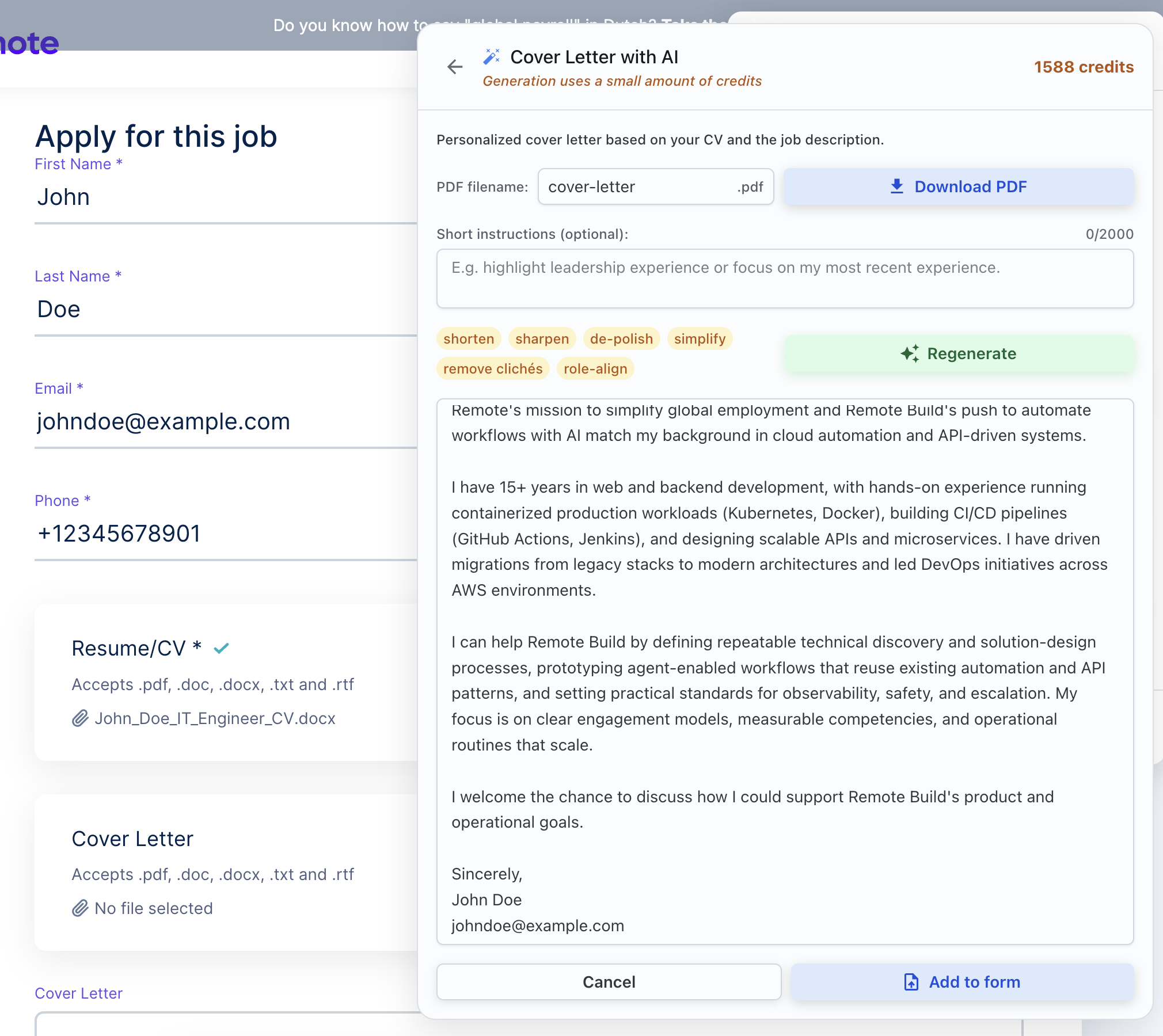
Any AI cover letter generator can draft a letter in seconds. The real differences are what it writes from — your resume and the actual job description, or a template with the company name swapped — and where the work happens: inside the application, or copy-pasting between tabs.
Full disclosure: we build ApplyBtn, one of the tools on this list. The criteria below apply to it the same way they apply to everyone else — including its limitations, which we list.
The short answer: ApplyBtn is the best AI cover letter generator if you want the letter written during the application itself — it drafts from your CV and the job description together, inside the form you're filling. Pick Kickresume for designed, template-based letters, Teal for letters attached to a job tracker, and ChatGPT if you'd rather prompt your way there for free.
We build ApplyBtn, an AI job application autofill extension with a cover letter generator inside it — which means we read real application forms and real cover-letter fields every day, and we test what competing tools produce for the same jobs. Where an entry is based on hands-on use, we say so; where it's based on product research — documentation, store listings, user reviews — we say that too.
No affiliate links, no paid placements. Pricing is noted as of July 2026; plans change, so check each vendor's site before you buy.
We judged the cover letter AI tools on this list — the AI-powered generators, platforms, and extensions alike — on the same five criteria:
Personalization — written from your resume and this job description, or a template with names swapped in?
Where the letter lands — generated inside the application you're filling, or copy-pasted from a separate app?
Your voice — how easy is it to review, edit, and de-robotify the draft before sending?
Free tier honesty — what does free actually include?
Privacy — what happens to your resume data?
Every tool below genuinely earns its spot — the rankings reflect how close each one gets to a letter you'd actually send, with the least copy-paste in between.
1
ApplyBtn — best for cover letters written inside the application
ApplyBtn is a Chrome extension that autofills the job application you have open — and when the form asks for a cover letter, it generates one right there, from your CV and that job's description together. No separate app, no pasting the posting into a chat window: the job context is already on the page, so the letter comes out written for that specific role.
You review and edit every draft before it goes anywhere, the same way you review every autofilled answer — nothing is submitted for you. It works in 12 languages, which also covers applying abroad with a letter in the language of the form. This is the tool we build, so weigh our claims against the rest of this page's criteria — they were written to apply to us too.
Strengths
✓Writes from your CV and the job description together — every letter is role-specific by construction
✓Generates inside the application form — no copy-paste from a separate tab
✓Fully editable draft; you send it in your own voice
✓Works in 12 languages
✓No dashboard setup — install, upload your CV, and go
Limitations
–Chrome only — no Firefox or Safari version
–Built for the application flow — it's not a standalone letter studio with template galleries
–No resume builder; it writes from the CV you upload
–AI actions use credits once the free welcome credits run out
Pricing (as of July 2026): Free to install with generous welcome credits — no credit card. After that, pay-as-you-go credits that never expire; no subscription.
Kickresume — best for designed, template-based letters
Kickresume is the design pick: an AI resume and cover letter builder with a large gallery of matching templates, so your letter and resume arrive as a visually consistent pair. Its AI writer drafts the letter from the details you enter in the builder, and the template system does the presentation work.
The flow is builder-first — you produce a polished document in Kickresume, then download it or paste the text into applications yourself. If you want a letter that looks designed rather than typed, this is the strongest gallery on the list; the tailoring to each specific job stays in your hands.
Strengths
✓Large template gallery with matching resume and cover letter designs
✓AI drafting plus ready-made phrase examples
✓Polished, presentation-grade output
Limitations
–Builder-first flow — you copy or attach the result into each application yourself
–Tailoring to a specific job description is manual — the AI writes from your profile, not the posting
–Full AI writing and most templates sit behind the paid plan
Pricing (as of July 2026): Free plan with basic templates. Premium unlocks the AI writer, the ATS resume checker, and the full gallery of 40+ resume and cover letter templates — €24/month, €18/month billed quarterly, or €8/month billed yearly, with a limited-time 20% discount running when we checked.
Teal — best for letters inside a job-tracking workspace
Teal treats the cover letter as one artifact in a bigger workflow: you save jobs into its tracker, tailor your resume against each posting, and generate the letter from that same saved context. If you're running a spreadsheet-style job search, having the letter live next to the application's status is genuinely convenient.
The free plan is generous on the workspace side — unlimited resumes and job tracking — and a taster on the writing side: one-time AI credits, 2 of them for cover letters. Teal+ lifts AI writing to unlimited. As with Kickresume, the letter is produced in Teal's workspace and travels to the actual application by copy-paste.
Strengths
✓Letter generated from the saved job posting plus your resume
✓Best-in-class application tracker around it
✓Unlimited tracking free — the workspace costs nothing
Limitations
–Free AI writing is a small one-time taster (2 cover-letter credits); unlimited needs Teal+
–Workspace-first — you copy the finished letter into each application
Pricing (as of July 2026): Free Forever plan: unlimited resumes and job tracking, top-5 keyword matching, and one-time AI credits (10 resume bullets, 2 summaries, 2 cover letters). Teal+ makes AI writing unlimited — cover letters included — and lifts templates, keyword matching, and resume analysis to unlimited. It's three separate prices, not one rate: $13 weekly, $29 monthly, or $79 quarterly (no annual plan).
Grammarly's AI cover letter generator is a free web tool: you upload your resume, enter the role, and paste the job's responsibilities, and it produces a clean first draft. Where Grammarly actually shines is the second step — its grammar, clarity, and tone checking follows you into whatever editor or form you finish the letter in.
It does take your resume and the job details you paste in, so it isn't working from nothing — but the output still skews formal and generic, a solid base you'll rewrite parts of, and cover letters are a side feature of a writing assistant rather than its focus. As a free draft-plus-polish pipeline, it's hard to argue with the price.
Strengths
✓Genuinely free to start — 100 AI prompts on the free plan
✓Best-in-class grammar, clarity, and tone checking on the result
✓The browser extension polishes your letter wherever you edit it
Limitations
–Output skews formal and templated — even from your resume and the job details, the letters read generic
–Cover letters are a side feature, not the product's focus
–Tone rewriting and advanced suggestions sit in the paid plan
Pricing (as of July 2026): Free plan covers the essentials — mistake-free writing, tone insights, and AI text generation with 100 AI prompts, which includes cover letter drafting. Pro adds one-click full-sentence rewrites, easy tone adjustment, unlimited personalized suggestions, plagiarism and AI-text detection, and 2,000 AI prompts — €12/month, with a 7-day free trial.
Rezi comes at the letter from the ATS angle: it's a resume platform built around keyword matching, and its AI cover letter writer inherits that DNA — drafts generated from your Rezi resume and the job description, with the platform nudging both documents toward the posting's language.
It's the right pick if your applications die in keyword screens and you want resume and letter optimized as a set. Like the other builders, the output lives in Rezi and gets attached or pasted into applications by you; and it assumes your resume lives in Rezi too — the letter writer is an extension of the resume product, not a standalone tool.
Strengths
✓Writes from your resume and the job description with ATS keywords in mind
✓Resume and letter optimized together, in one platform
✓Free try-it tier with the AI writer and editor included
✓One-time Lifetime option — no subscription if you'd rather pay once
Limitations
–Resume-first product — the letter writer assumes your resume is built in Rezi
–Workspace output: you attach or paste the letter into each application
–Free tier is a taster — 1 resume and 3 PDF downloads; Rezi Score and keyword targeting sit in Pro
Pricing (as of July 2026): Free tier to get a feel for it — 1 resume, 1 AI interview, and 3 PDF downloads, with the AI writer and editor included. Pro is $29/month for unlimited resumes and downloads, all templates, Rezi Score, and keyword targeting — or a one-time $149 Lifetime plan with all features.
ChatGPT is what most people actually try first, and used well it's a legitimate cover letter generator: paste your resume, paste the job description, describe the tone you want, and iterate. Total control, zero cost, and the ceiling is high if you're good at prompting.
The catch is that the quality is entirely on your prompt. Ask lazily — "write me a cover letter for this job" — and you get the same enthusiastic template half the applicant pool is sending. You'll also re-paste your CV and the posting for every single job, and carry the result into the application yourself. It's the most work of anything on this list; it's also the only one that's completely free forever.
✓Total control — tone, structure, and length are whatever you ask for
✓Doubles as an editor: paste any draft back in and ask for a rewrite
Limitations
–Quality depends entirely on your prompt — lazy prompts produce the template everyone else sends
–No memory of your CV or the posting between jobs — you re-paste context every time
–Fully manual workflow: generate, copy, paste, format, attach
Pricing (as of July 2026): Free tier covers cover-letter writing comfortably, within message limits. Paid tiers mostly buy more usage: Go at $8/month adds more messages and longer memory (and may include ads), Plus at $20/month adds the stronger reasoning models — overkill for cover letters alone.
AI cover letter generators vs writing it yourself with ChatGPT
Every tool on this list sits somewhere between two poles: full DIY (ChatGPT — free, powerful, and entirely on you) and full integration (the letter written inside the application, from context the tool already has). The builders in between trade some control for templates, tracking, or keyword targeting — and all of them end in the same step: you carrying the finished letter into the actual application.
That last step is the honest difference. If you're writing one careful letter for a dream job, DIY is fine. If you're applying to twenty jobs a week, the copy-paste tax is where your evenings go — and a generator that writes the letter where you apply, from your CV and the job description it can already see, removes that step entirely.
Match the tool to how you actually apply — there's no single best AI for cover letter writing, and the best AI cover letter generator is simply the one that fits your workflow:
You want the letter handled while you apply, not before
ApplyBtn — the letter is generated inside the application form, from your CV and that job's description.
You want a designed letter that matches your resume
Kickresume — the strongest template gallery, with resume and letter as a visual pair.
You track every application and want letters attached to jobs
Teal — letters generated from the saved posting, next to the application's status.
Your budget is exactly zero
ChatGPT with a careful prompt, or Grammarly's free generator plus its polish tools.
Your applications die in keyword screens
Rezi — resume and letter optimized together against the posting's language.
Whichever you pick: the letter that gets read is specific to the job and sounds like you. The tool's job is the first draft and the retyping — the judgment stays yours.
Best AI cover letter generators — FAQ
What is the best AI cover letter generator?
It depends on where you want the work to happen. ApplyBtn is the best AI cover letter generator for the applying itself — it writes the letter inside the application form, from your CV and the job description together. Kickresume is best for designed, template-based letters, Teal for letters attached to a job tracker, Rezi for ATS keyword targeting, and ChatGPT or Grammarly for free drafting you steer yourself.
What are the best AI cover letter writers?
The best AI cover letter writer for you depends on where you want the work to happen. ApplyBtn writes the letter inside the application form, from your CV and the job description; Rezi and Teal draft from your resume plus a saved posting; and Kickresume pairs the letter with a designed template. If you'd rather steer it yourself, the best AI to write a cover letter for free is ChatGPT with a careful prompt, or Grammarly's free generator. There's no single winner — match the writer to how you actually apply.
What is the best free AI cover letter generator?
The best free AI cover letter generator depends on how much steering you're willing to do. ChatGPT's free tier is the most capable if you write a careful prompt with your resume and the job description pasted in. Grammarly's generator is free with zero setup but produces generic drafts. ApplyBtn's welcome credits get you tailored letters written inside the application — free to start, no card, though not unlimited. Teal, Kickresume, and Rezi all offer free tastes with paid plans behind them.
Which AI cover letter generator works from my resume and the job description?
Three tools on this list write from both near-automatically: ApplyBtn (it reads your uploaded CV and the job page you're applying on), Rezi (from your Rezi-built resume plus the posting you add), and Teal (from your resume plus the saved job). ChatGPT and Grammarly take your resume and the job details too, but you supply them each time — ChatGPT by pasting both, Grammarly by uploading your resume and pasting the role's responsibilities into its form. Kickresume works mainly from profile details you type in, so job-specific tailoring stays manual.
Will employers know my cover letter is AI-generated?
They'll notice a template — AI or otherwise. What reads as "AI-generated" is the generic letter that never mentions anything specific: same opener, same enthusiasm, no detail from the actual job. A letter drafted from your real CV and the posting's requirements, then edited into your own voice, doesn't have that tell. Whichever generator you use, edit before sending — that's also simply how you stay honest about what you're signing.
Is ChatGPT good enough for cover letters?
Yes — if you do the setup each time. Paste your resume, paste the job description, specify tone and length, and iterate on the draft; the result can match any paid tool. The gap isn't quality, it's workflow: no memory of your CV between jobs, no connection to the application itself, and the discipline to re-do the full prompt for every role. Dedicated generators exist to remove exactly that overhead.
What do AI cover letter generators cost?
Free covers more than you'd expect: ChatGPT costs nothing, Grammarly includes 100 AI prompts free, and Teal, Rezi, Kickresume, and ApplyBtn all start free. Heavier or unlimited generation is where paid plans appear: Grammarly Pro at €12/month, Kickresume Premium from €8/month billed yearly to €24/month, Teal+ at $13/week, and Rezi Pro at $29/month — or Rezi's one-time $149 Lifetime plan. ApplyBtn skips the subscription: welcome credits free, then pay-as-you-go credits that never expire. Prices as of July 2026; check each vendor for current plans.
Are AI-powered cover letter tools worth using?
Yes — as long as you edit what they produce. A good one gets you past the blank page in seconds and, at its best, drafts from your real CV and the actual job description, so the letter is specific from the first line instead of the template half the applicant pool is sending. The catch is the same across every option: the draft still needs your voice before it goes out. Used that way, AI-powered cover letter tools are worth it; used as one-click autopilot, they produce exactly the generic letter recruiters skim past.
Your next cover letter, written where you apply
Install ApplyBtn, open a job application, and get a letter drafted from your CV and that job's description — inside the form, ready to edit in your voice. Free welcome credits, no credit card, and nothing is sent without you.