
AI Job Application Autofill
One click. Filled.
Autofill job applications directly on the page with AI-generated answers and cover letters based on your CV and the job description.
No credit card required • Free welcome credits
2-minute setup
 🏆 #1 Winner of the Month on MicroLaunch5.0 on Chrome Web Store · 16 ratings
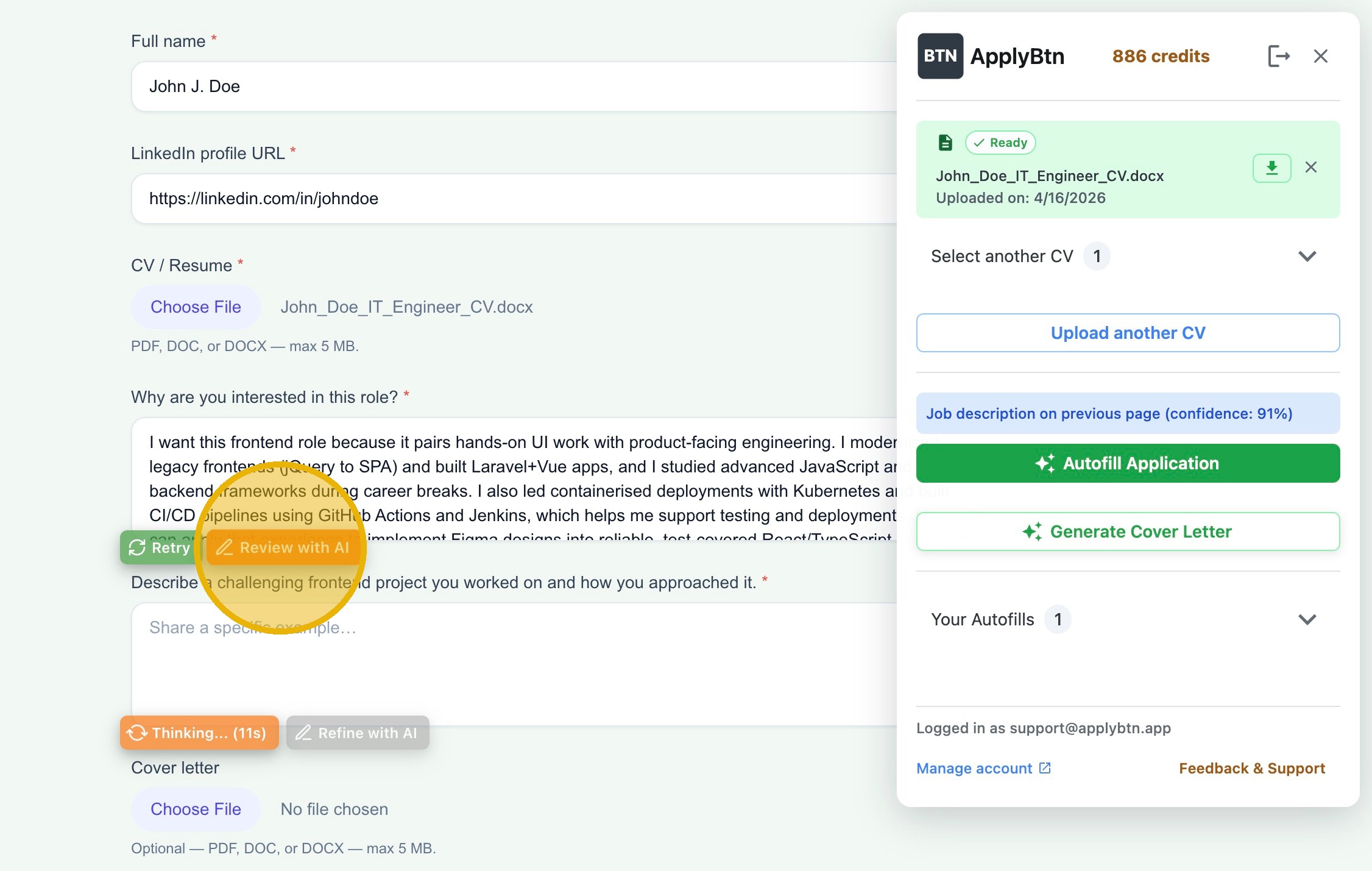
ApplyBtn autofilling a real job application — answers generated from your CV and the job description, right inside the form.
ApplyBtn is an AI Chrome extension that helps you complete online job applications faster. Instead of rewriting the same answers, summaries, and cover letters for every role, ApplyBtn uses your selected CV and the job description to generate tailored application content directly inside the form.
You stay in control at every step. ApplyBtn helps fill the application, but it does not submit anything automatically.
★ 5.0 — Chrome Web Store ratingWe build for the form on the page, not for a platform list.
More than 50% of the forms ApplyBtn fills live on custom company career pages.
of filled forms are on custom company career pages — no major ATS behind them
career sites we fill are ones ApplyBtn has never seen before — and they just work
named ATS platforms filled in production, plus the long tail of custom forms
Shares from aggregated, anonymized ApplyBtn production data: application forms processed between 30 April and 25 August 2026, internal test accounts excluded.
How ApplyBtn works
Upload your CV
Upload your CV (resume) once. ApplyBtn uses it as the source for your experience, skills, background, and application answers. You can upload multiple CVs and choose the right one for each role.
Open a job application page
Go to the job application form you want to complete. ApplyBtn works directly on the page, so you do not need to copy the job into a separate dashboard or rebuild your profile from scratch.
Generate tailored answers
ApplyBtn reads the form context and uses your CV together with the job description to generate relevant answers. This is especially useful for open-ended questions that take longer than basic autofill fields.
Review, refine, and submit manually
You can edit answers yourself, refine them with AI, regenerate content, or adjust the final text before submitting. ApplyBtn never submits applications automatically.
What ApplyBtn fills — and what it leaves to you
Filled for you
- contact details, address, and profile links
- work experience and education — including repeating “add another” sections
- your CV file — even when the upload field hides behind a styled box
- open questions — a tailored answer drafted from your CV and the job description, ready for your review
- cover letter boxes
- searchable country and city pickers — filled only on a clear match, never a guess
Left to you — on purpose
- dropdown menus, radio buttons, and checkboxes — the choices stay yours (one exception: the “I currently work here” box)
- self-identification questions — gender, ethnicity, disability, veteran status. Never auto-filled, by design: ApplyBtn flags them for your input instead
- answers only you know — salary expectation, start date, notice period, referral names. ApplyBtn never invents them
No onboarding
Instead:
Your CV is your profile.
Multiple CVs — multiple profiles.
Missing something? Type it once and hit Remember — ApplyBtn fills it into the next application. Each CV keeps its own remembered values, so your engineering and consulting profiles never mix.
Tailored answers from your CV and the job description
Your CV
Experience, skills, and background
Job description
Requirements, responsibilities, and keywords
Tailored answers & cover letters
Adapted to the specific role, ready for you to review
ApplyBtn uses your CV as the source of truth and the job description as context.
That means answers can be adapted to the specific role instead of sounding like a generic template. If the job emphasizes frontend development, customer support, marketing, operations, product work, or another area, ApplyBtn can use the relevant parts of your background when generating application answers.
You can still edit everything before sending. ApplyBtn helps draft and autofill. You make the final decision.
Cover letters for each job application
Many applications still ask for a cover letter, even when you have already uploaded a CV.
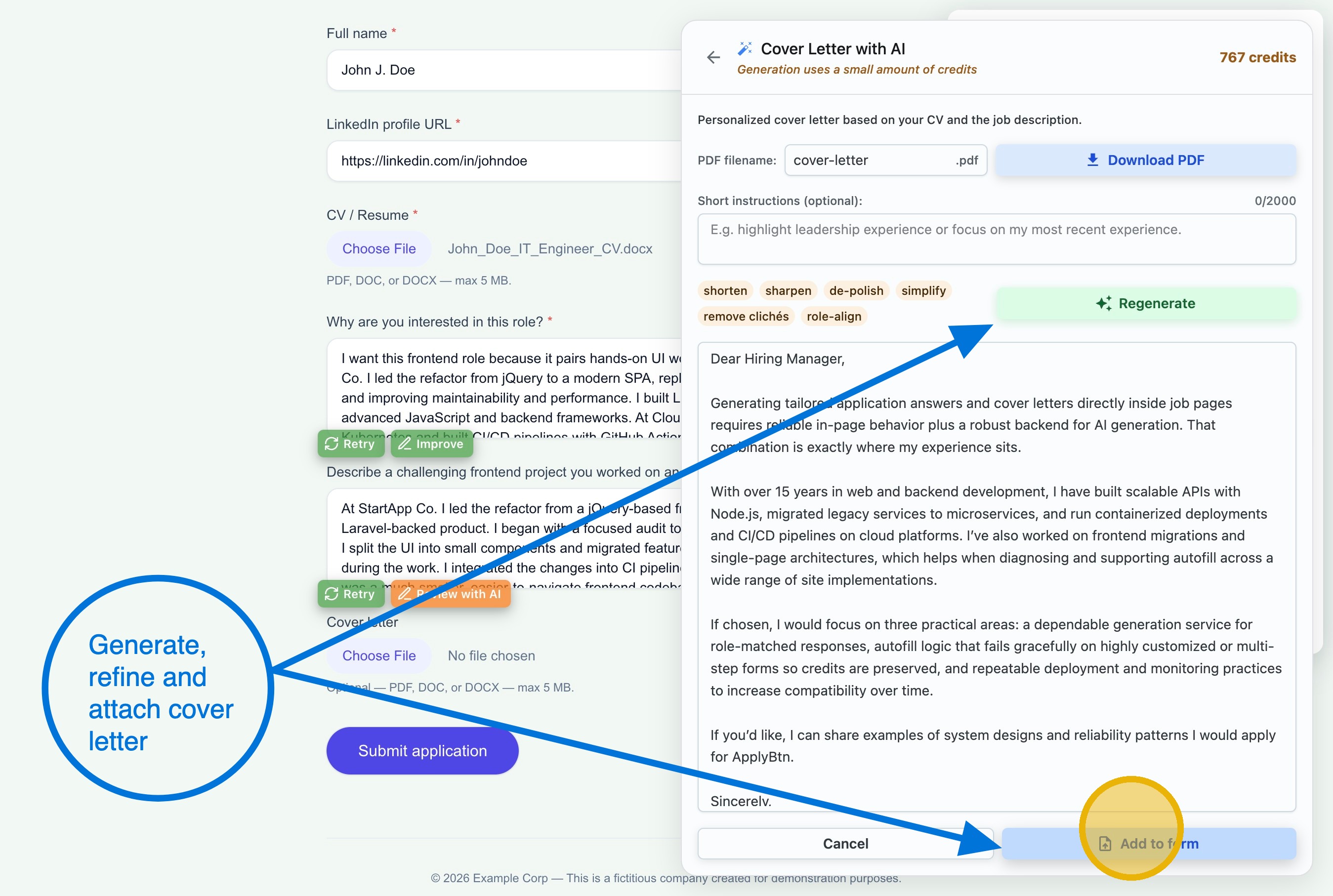
ApplyBtn can generate a tailored cover letter using your CV and the job description. You can review it, refine it, change the tone, edit details, and insert it into the application form when you are ready.
This helps avoid sending the same generic cover letter everywhere.
AI tools to apply for jobs: autofill vs auto-apply
Not an auto-apply bot
ApplyBtn is job application autofill, not auto-apply.
ApplyBtn does not automatically submit applications. It does not apply to jobs on your behalf. It does not remove human review from the process.
You choose:
- when to run it
- which CV to use
- what content to generate
- what to edit
- when to submit the final application
Useful for multilingual job applications
English CV, German form? No problem. ApplyBtn is a multilingual job application tool: it can autofill job applications in different languages, writing the answers in the language of the form.
Apply in different languages — across countries, local job boards, and international companies. No job application translator needed, and no need to translate job application answers yourself — they come out in the form's language.
12 languages supported: English, Spanish, Dutch, German, French, Italian, Swedish, Norwegian, Danish, Portuguese, Turkish, and Polish.
ApplyBtn autofills ATS platforms and career sites
No supported-sites list. ApplyBtn reads the form on the page — new career sites just work.
When one breaks, we fix it.
Seen and filled in production, among others:
 Workday
 Greenhouse
 Ashby
Ashby Personio
 Lever
Lever Recruitee
 Workable
 SuccessFactors
 iCIMS
iCIMS Teamtailor
 Taleo
Taleo- Oracle HCM
 BambooHR
 Eightfold
Not every form fills perfectly — Workday's custom date pickers are a known example. We fix these release by release. If autofill can't run, no credits are used.
ApplyBtn fills out job applications on company websites
- company career pages
- job boards
- local hiring websites
- custom application forms
- major ATS platforms
It is an AI that fills out job applications where you actually apply — a browser extension for job applications, not a separate profile builder or dashboard. Your CV plus the job description, filled and drafted right inside the form.
Frequently asked questions
Apply faster with AI job application autofill
Stop rewriting the same job application answers and cover letters from scratch.
Use ApplyBtn to autofill job applications directly on the page, generate tailored answers from your CV and the job description, and review everything before submitting.