1
ApplyBtn — best for autofilling real application forms
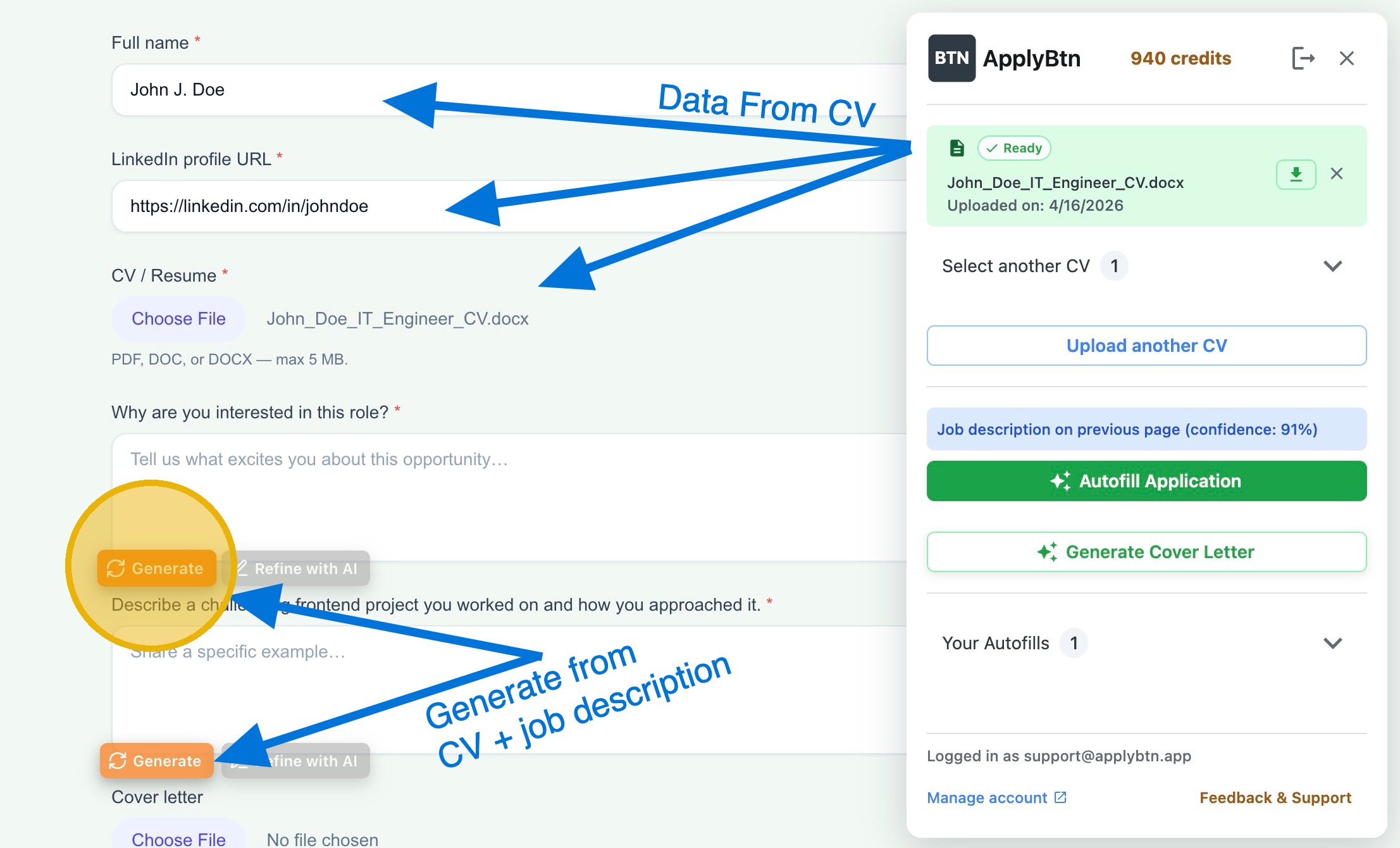
ApplyBtn is a Chrome extension that fills the job application form directly on the page you have open — company career sites, big ATS platforms like Greenhouse, Lever, and Workday, and the messy custom forms in between. It reads your CV and the job description together, so open questions get answers written for that specific role, not a saved template.
It also generates tailored cover letters inside the form, works in 12 languages, and never auto-submits — you review and send every application yourself. This is the tool we build, so judge our claims by the public head-to-head: we published screenshots of every form in our JobWizard comparison.
Strengths
- ✓Tries to fill any form it detects — real-world forms, not a supported-platforms list
- ✓Matches your CV to the job description — answers and cover letters tailored to each role, right inside the form
- ✓No dashboard and no manual setup — install, upload your CV, and go
- ✓Multilingual forms — works in 12 languages
- ✓You stay in control — nothing is submitted for you
Limitations
- –Chrome only — no Firefox or Safari version
- –No job matching or application-tracking board
- –Not every field gets filled — multi-step wizards (e.g. Workday) and complex flows can need manual finishing
- –AI actions use credits once the free welcome credits run out
Pricing (as of July 2026): Free to install with generous welcome credits — no credit card. After that, pay-as-you-go credits that never expire; no subscription and no weekly caps.
2
JobWizard — best for quick fills on major ATS platforms
JobWizard is an autofill extension focused on the big, predictable ATS platforms. In our June 2026 head-to-head it filled Greenhouse and Lever forms quickly and cleanly, and it offers AI answers for application questions.
The gaps showed up beyond the supported list: on several regional ATSs, custom company forms, German-language forms, and the Workday experience step, it reported "Not supported" or stopped mid-flow. If your applications live mostly on major platforms, it does the job; if they don't, coverage is the risk.
Strengths
- ✓Fast, clean fills on major supported ATSs (Greenhouse, Lever)
- ✓AI-generated answers for application questions
- ✓Generous free plan — 30 autofills + AI answers per week
Limitations
- –Supported-platform approach — regional ATSs and custom forms often unsupported (per our June 2026 tests)
- –Struggled with multi-step and non-English forms in our tests
Pricing (as of July 2026): Free plan ($0, no time limit): 30 autofills and AI answers per week on a shared quota, 30 cover letters per week, plus always-free job tracking with match scores. Paid plans lift the weekly caps.
3
Simplify — best for one-click applications and tracking
Simplify (Simplify Copilot) is the volume player: a Chrome extension that autofills applications across many supported job boards and ATSs, paired with a solid application tracker. It's profile-first — you onboard on their website and type your data into the dashboard, and the extension then replays those fields into application forms.
The free plan's autofill is unlimited but old-school: no AI involved — it fills supported forms with the data you entered in the dashboard, and skips sites it doesn't recognize. Everything AI sits behind Simplify+ — resume tailoring, personalized cover letters, generated answers to open-ended questions; on free you save and reuse answers you wrote yourself. As a free tracker plus profile-replay filler it's solid; as an AI writer it's a subscription.
Strengths
- ✓Unlimited free autofill on supported ATSs
- ✓Supports many major ATSs and job boards
- ✓Unlimited tracking with auto-added applications
Limitations
- –Fills only on known ATSs — unrecognized sites are skipped
- –Profile-first setup: onboarding and typing your data into their dashboard before anything fills
- –No AI on the free tier; generation (resumes, cover letters, open questions) requires Simplify+
Pricing (as of July 2026): Free plan: unlimited non-AI autofill and tracking. Simplify+ unlocks the AI generation suite — $19.99/week, $39.99/month, or $89.99 per three months (same features on every plan; longer runs cheaper per day).
4
Teal — best for resume building and job tracking
Teal is less an autofill tool and more a job-search workspace: an AI resume builder, a job tracker, and keyword matching that scores your resume against each posting.
If your problem is staying organized across dozens of applications and tailoring your resume to each one, Teal is excellent. Actually filling application forms isn't its focus — pair it with an autofill extension if the forms are what slow you down.
Strengths
- ✓Strong AI resume builder with per-job keyword matching
- ✓Best-in-class application tracker
- ✓Unlimited resumes and job tracking on the free plan
Limitations
- –Form autofill is not the product's focus
- –AI writing is metered on free — a few one-time credits (10 bullet, 2 summary, 2 cover letter); unlimited only on the paid plan
Pricing (as of July 2026): Free Forever plan: unlimited resumes and job tracking, top-5 keyword matching, and a small one-time AI taster (10 bullet + 2 summary + 2 cover-letter credits). The paid plan makes AI and templates unlimited — $13/week, $29/30 days, or $79/90 days; no credit card to start, cancel anytime.
5
Jobright — best for AI job matching
Jobright attacks the other end of the pipeline: finding the right jobs. Its AI matches you to roles, scores the fit, tailors your resume, and suggests insider connections — an "AI copilot" for the search itself.
It's a web app rather than a browser extension, and the applying step remains largely yours to do. If discovery is your bottleneck — you don't know where to apply — it's the strongest matching tool on this list; combine it with an autofill extension for the forms.
Strengths
- ✓High-quality AI job matching with fit scores
- ✓Resume tailoring per matched role
- ✓Active job discovery instead of keyword alerts
Limitations
- –No Chrome extension — applying still happens manually on each site
- –Strongest for the US market
- –Free tier is gated by daily credits — the full AI suite needs Turbo
- –Aggregates third-party listings, so some roles show up expired or already filled — verify on the employer's page; its AI-generated resume is usable but generic and needs editing
Pricing (as of July 2026): Free plan with limited daily credits (job alerts, tracking, basic AI resume help — resets daily). Turbo unlocks unlimited applications, full AI resume optimization, Orion AI coaching, and Insider Connections — $17.99/week, $39.99/month, or $89.99 per quarter (≈$30/month).
6
LazyApply — best for bulk auto-apply
LazyApply is pure volume: it auto-applies to large numbers of jobs on LinkedIn, Indeed, and other boards while you do something else. For sheer applications-per-day, nothing on this list matches it.
The trade-off is quality and control. Answers are generic by design, mis-filled fields happen at volume, recruiters increasingly recognize mass applications, and bulk automation can conflict with job-board terms of service. Use it for wide-net roles where volume beats tailoring — not for the jobs you care most about.
Strengths
- ✓Highest application volume with minimal effort
- ✓Covers major job boards in one run
Limitations
- –Generic answers — no per-job tailoring
- –You give up review before submission
- –Bulk automation can conflict with board rules; quality risk at volume
- –Low Trustpilot rating (~2.2/5, mostly 1-star), with recurring complaints of inaccurate fills and refund friction — despite an advertised 30-day money-back guarantee
Pricing (as of July 2026): Paid only, billed yearly: Basic $99/year (15 applications/day, 1 resume profile), Premium $149/year (150/day, 5 profiles), Ultimate $999/year (1,500/day, 20 profiles). A Gmail account is required.
7
AIApply — best for AI documents plus auto-apply in one place
AIApply is the product behind the "AI apply" name people search for: a web suite that generates resumes and cover letters, optimizes them for ATS screens, preps you for interviews (Interview Buddy), translates documents, and runs automated job applications on a credit system — 1 credit equals 1 application, and credits never expire.
The honest catch is the split billing: the Pro subscription buys unlimited document generation, the prep tools, and starting application credits, while high-volume auto-apply runs on separately purchased credit packs. And the auto-apply half carries the same trade-off as every volume tool on this list — applications go out fast, but you give up per-application review and tailoring. The 40% student discount is real and rare in this category.
Strengths
- ✓Unlimited AI resumes and cover letters with ATS optimization on Pro
- ✓Auto-apply credits never expire — pay for volume only when you need it
- ✓Interview prep and document translation round out the suite
- ✓40% student discount with a verified school email
Limitations
- –Auto-apply means giving up per-application review and tailoring
- –Two payment layers for the full experience — subscription plus credit packs
- –Applying runs from its dashboard, not inside the form you're on — its Chrome extension co-pilots interviews, it doesn't fill forms
- –Auto-renews unless you cancel 24 hours ahead, fees are non-refundable per its Terms, and it holds an 'F' rating with the Better Business Bureau (5 complaints, 4 unanswered)
Pricing (as of July 2026): Free plan: limited cover letters, a resume scanner, and core job-board access. Pro is $29/month, or about $12/month billed annually — unlimited AI resumes and cover letters, ATS optimization, Interview Buddy, translations, and starting application credits. Automated applications run on separate credit packs (1 credit = 1 application, never expire). Verified students get 40% off.
8
Careerflow — best for LinkedIn optimization and coaching
Careerflow is a job-search suite built around your professional presence: an AI LinkedIn profile review and score, a job tracker, resume tools, and coaching resources, with a Chrome extension tying it together.
Its autofill is basic compared to the dedicated tools above — the reason to pick Careerflow is the LinkedIn side. If recruiters finding you matters as much as you finding them, it covers ground no other tool on this list does.
Strengths
- ✓AI LinkedIn profile review and optimization score
- ✓Job tracker plus a broad set of free tools
Limitations
- –Autofill is basic compared to dedicated extensions
- –The suite spreads across many small tools rather than one deep one
Pricing (as of July 2026): Free plan with unlimited resume analysis and the core tools. Premium adds unlimited AI resumes, ATS optimization, and bullet/summary writing — $23.99/month, down to ≈$14.41/month billed yearly ($172.99). Premium Plus adds AI mock interviews and interview analysis — $44.99/month, down to ≈$24.99/month billed yearly ($299.99). Weekly and quarterly billing also available.