ApplyBtn - AI Job Application AutofillApplyBtn

AI Job Application Autofill.
Apply in seconds.

Chrome extension for instant job application autofill, right on the job page.
No more rewriting long answers or cover letters.

Add to Chrome – It's Free

No credit card required • Free welcome credits
2-minute setup

Better job applications. Faster.

Autofills where you apply

AI job application autofill right on any job page.

Context-aware AI answers for open-ended questions

AI-generated responses tailored from your CV and the job description.

You control what gets submitted

Review, refine, and submit - nothing is sent automatically.

Tailored cover letters for every job

Generate personalized cover letters from your CV and the job description.

ApplyBtn is an AI-powered Chrome extension designed to help job seekers apply faster and more efficiently. Instead of rewriting the same answers and cover letters for every application, ApplyBtn autofills job forms directly on the job page and generates tailored responses based on your CV and the job description. Whether you're applying through a company website or any job board, ApplyBtn works directly inside the application form - giving you full control before you submit. It's job application automation built for real users, without auto-submitting or selling your data.

No Subscription Required

Simple credit-based pricing

Usage: ApplyBtn operates on a credit-based system. No subscription required. Credits are consumed per autofill action. Free welcome credits included.

See ApplyBtn in action

Autofill applications on any job page - plus AI-refined answers and cover letters that match the role you’re applying for.

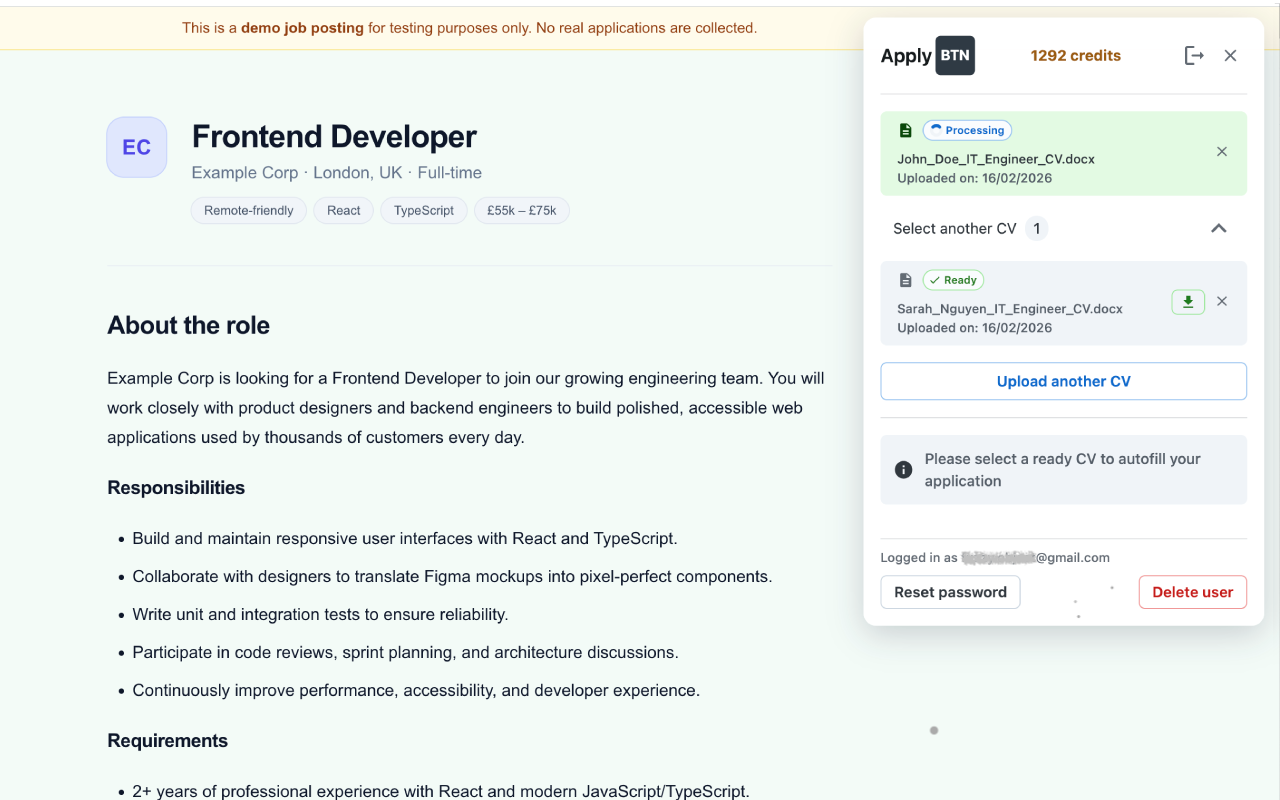
ApplyBtn opens on a job application form and detects fields automatically
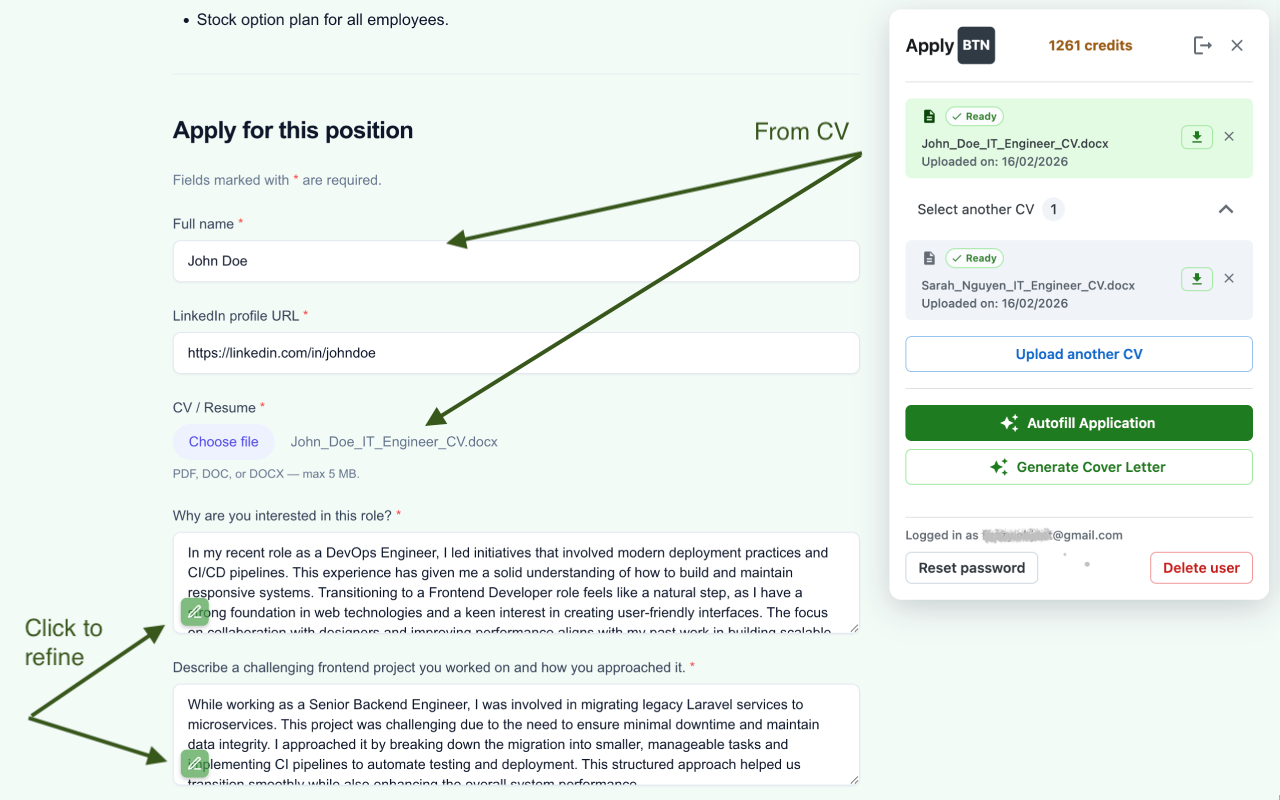
Autofill fills the form with your profile details in a few seconds
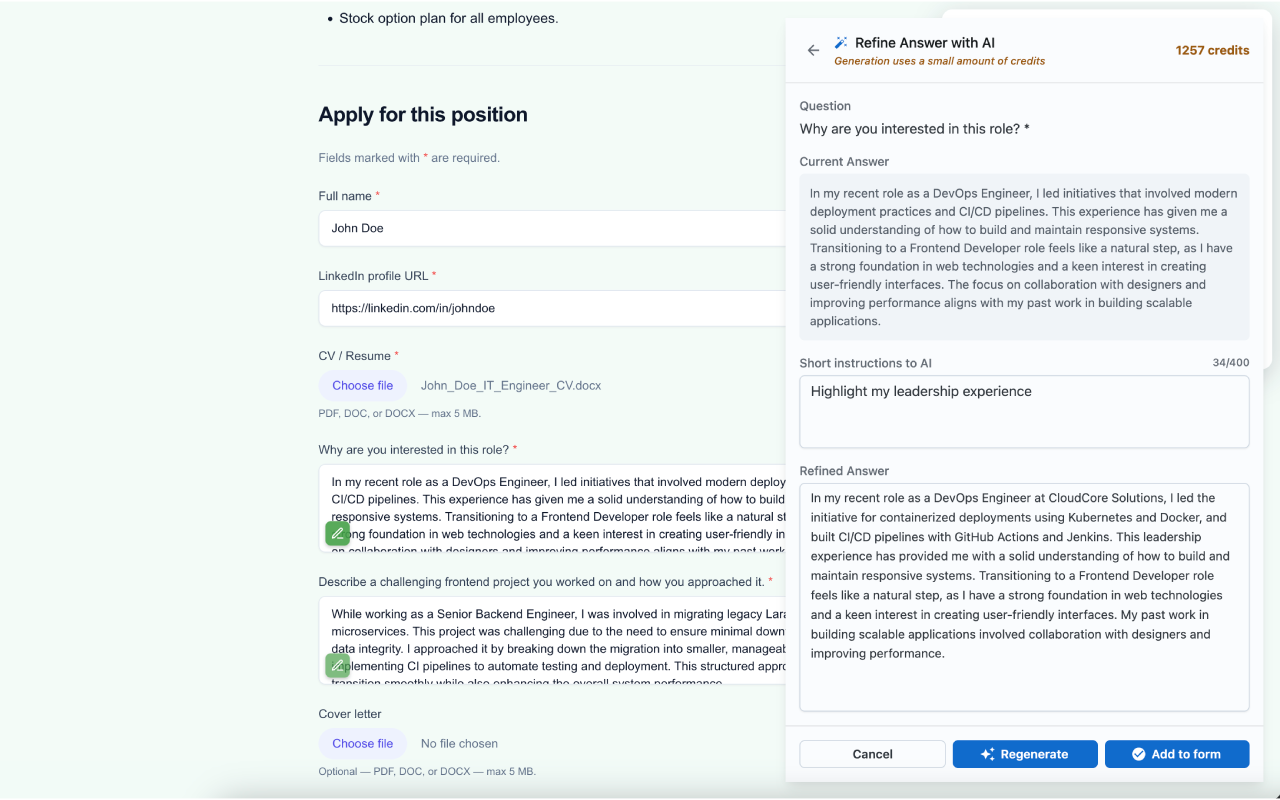
AI generates a tailored answer for an open question with an edit option
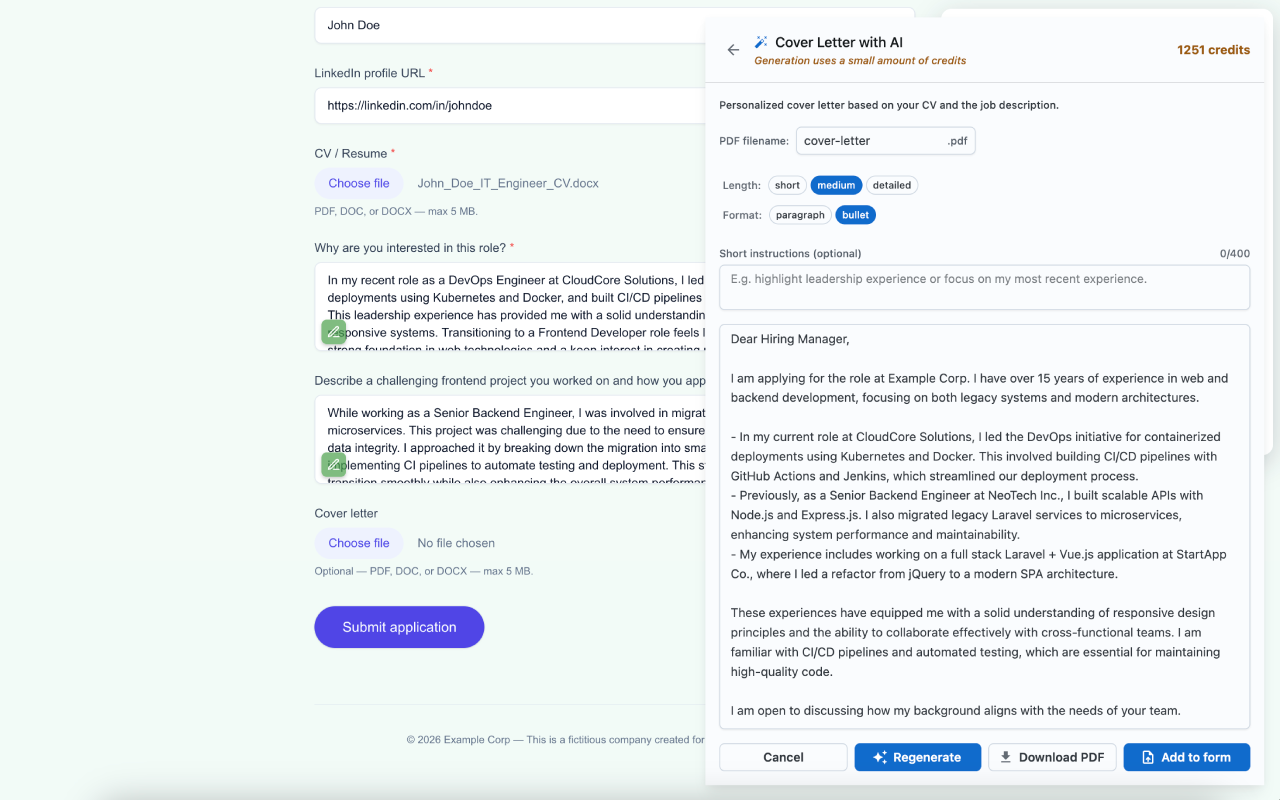
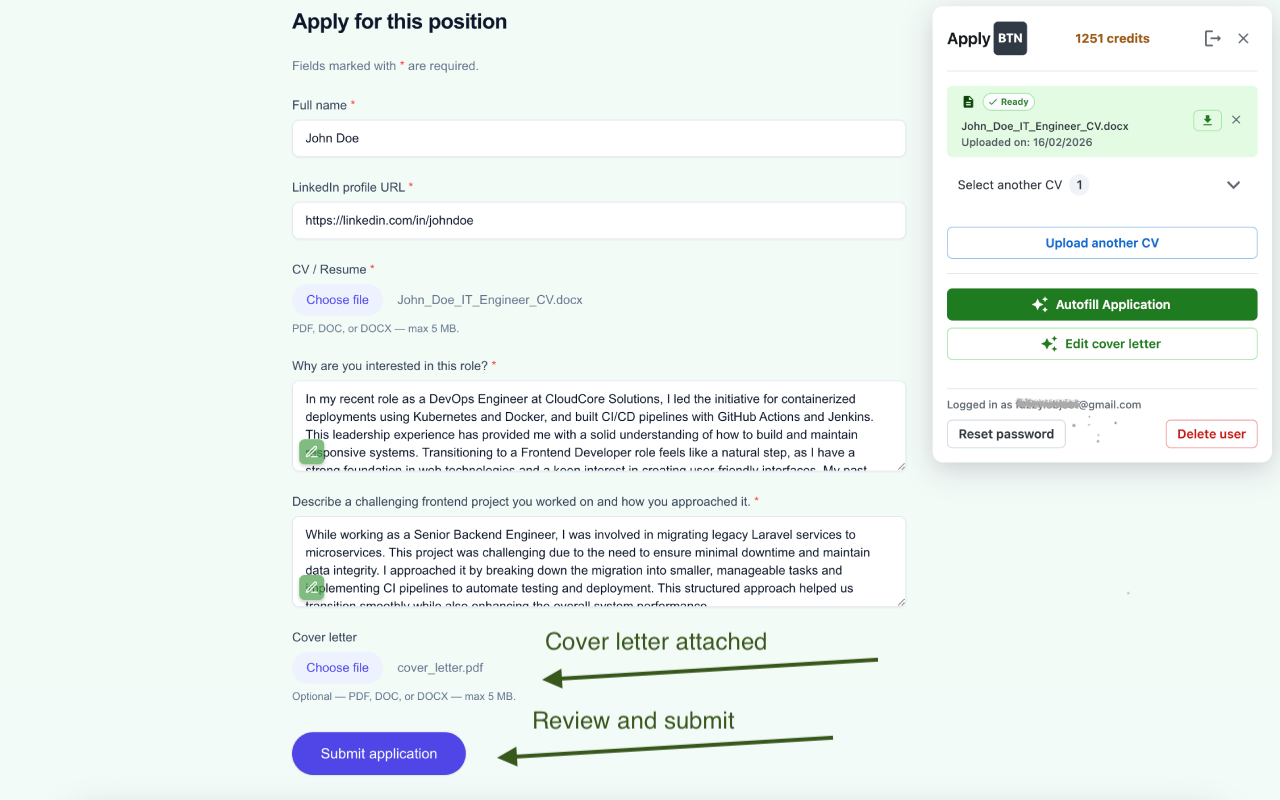
Cover letter draft is generated from your CV and the job description
Review, refine, and copy the final answers before submitting the application

How ApplyBtn autofills job applications

Get started in three simple steps

Step 1

Upload your CVs once

The AI uses this information to generate tailored answers and cover letters.

Step 2

Open any job application page

When you open a job application form, ApplyBtn detects it directly on the page - whether it’s a company website or a job board.

Step 3

Autofill, refine, and submit

Generate tailored answers and cover letters. Refine anytime with AI or edit manually before submitting. Nothing is sent automatically.

Your privacy matters

We built ApplyBtn with your trust in mind

No data selling

Your info stays yours

No auto-apply

You approve every submission

No spam emails

We won't flood your inbox

Frequently Asked Questions

How it works, how your data is handled, and what to expect.

ApplyBtn is a Chrome extension that works directly inside the job application page, not just on specific ATS platforms. Whether you're applying through a company website, a major job board, or a smaller local listing, the extension detects the application form and helps autofill relevant fields with AI. Because it operates on the actual job page, you're not limited to a predefined list of supported sites.
ApplyBtn works on most standard job application pages. Some highly customized, multi-step, or extended registration systems may limit autofill functionality. If autofill cannot run properly, no credits are used. We continuously improve compatibility to support more job application formats over time.
No. ApplyBtn never auto-submits applications. It helps you autofill job forms and generate tailored answers, but you always review, edit, and submit the application yourself. You can refine answers multiple times with AI or adjust them manually before sending anything. You stay fully in control at every step.
Yes. ApplyBtn is built with a privacy-first approach. Your data is never sold or shared with third parties. Information from your CV and the job description is only used to generate tailored answers and cover letters. You control when the extension runs and what gets submitted.
ApplyBtn analyzes the job description alongside your CV to generate tailored responses for application fields and open-ended questions. Instead of rewriting the same content repeatedly, the AI adapts your experience to match each specific role. You can refine answers multiple times with AI, regenerate improved versions, or edit them manually before submitting. This improves job search efficiency while keeping applications personalized.
ApplyBtn analyzes the job description together with your selected CV to generate precise, role-specific answers. The AI uses the context of the position - including requirements, responsibilities, and keywords - to adapt your experience to each application. This ensures responses are tailored to the specific job, not generic templates.
Yes. ApplyBtn generates tailored cover letters based on the job description and your background. Each letter is contextual to the role you're applying for. You can refine the content multiple times with AI, edit it manually, and adjust the tone before submitting.
Yes. You can upload multiple CVs and select which one to use when applying. This makes it easy to tailor applications for different roles or industries. Everything is managed in one place inside the ApplyBtn Chrome extension, without external dashboards or separate profile systems.
ApplyBtn uses a credit system for AI-powered features such as CV parsing, autofilling answers, refinements, and cover letter generation. Each action consumes a small number of credits depending on the complexity of the request. <strong>Credits never expire</strong> under the current pricing model, and you always see your remaining balance before generating content.
Yes. Every new account receives welcome credits so you can test the system before purchasing anything. You can try autofill, generate answers, refine responses multiple times, and create tailored cover letters to see how ApplyBtn works in real job applications.
No. You don't need a subscription or to provide a credit card upfront. Every new account receives welcome credits so you can test ApplyBtn before purchasing additional credits. You only pay if you decide to continue using AI-powered features.
No. ApplyBtn does not require you to create a profile or complete setup steps on the website before applying. Install the Chrome extension, open a job application page, and start autofilling directly inside the form. There's no separate profile builder, external dashboard, or pre-work required.

Ready to simplify your job search?

Join thousands of job seekers who are applying in seconds.

Add to Chrome – It's Free

No credit card required • Free welcome credits
2-minute setup